


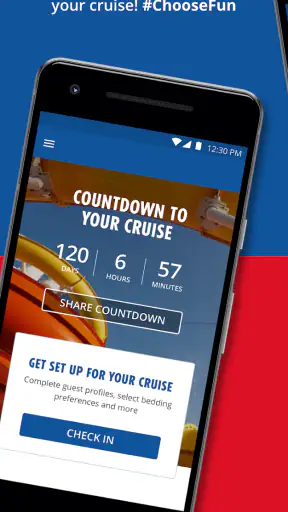
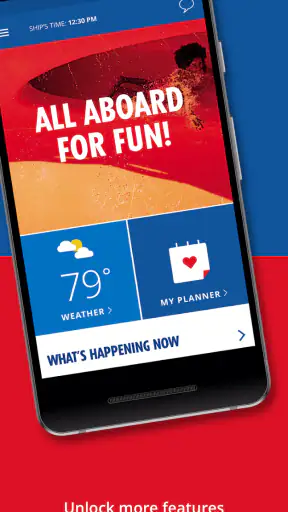
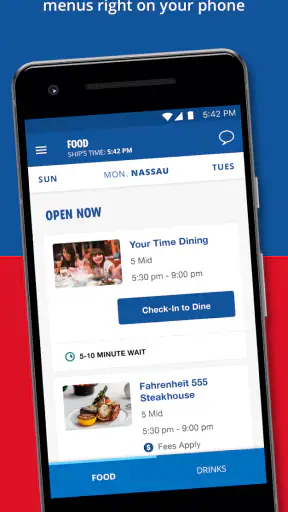
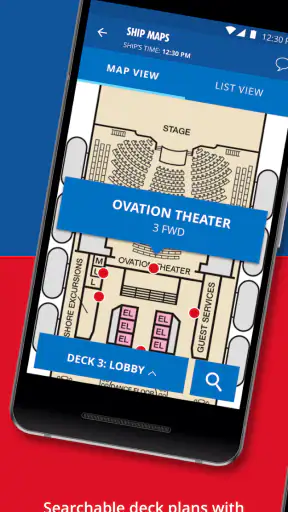

On a Carnival cruise, the phone in your hand can either make the day easier or become one more thing to manage. Carnival HUB is designed for that very specific situation: it is a free Travel & Local app from Carnival Corporation that brings cruise information and onboard planning into a mobile format. I found it most useful when I wanted to check what was happening without carrying printed information around or trying to remember a schedule from earlier in the day.
The important distinction is that this is not a general travel planner. It is not meant to compare flights, organize a road trip, or replace a broad map and booking service. Its value begins when you are vacationing on a Carnival ship. In that setting, the app can act as a central point for the practical details that otherwise compete for your attention: activities, plans, and the small decisions that shape each day at sea.
That narrow purpose is also its biggest strength. I would recommend it to someone who likes having a flexible cruise day rather than following a fixed itinerary. I would be more cautious with it for a traveler who expects a complete travel companion that works equally well before, during, and after a cruise.
How Carnival HUB fits into a connected cruise day
The moments when connectivity matters most
The app makes the most sense during those in-between moments when you are already moving around the ship. You might be leaving breakfast, deciding what to do next, or trying to coordinate with family members who have split up. A phone is already easier to reach than a paper schedule, so having cruise information in the same place reduces the need to walk back to a cabin or search through several sources.
That convenience depends on the app being able to refresh or display the information you need at the right time. Cruise plans can change, and a schedule is only useful if it reflects the current day. I therefore treated Carnival HUB less like a static brochure and more like a connected noticeboard. Before heading across the ship, I would check the relevant details first rather than assuming that something remembered from earlier was still accurate.
This is a subtle but important habit. The app is not simply about reading information; it changes how you make decisions. Instead of committing to the first activity you notice, you can look at the broader day and choose around meals, family plans, or a quieter period. That makes it particularly helpful for people who dislike wasting time walking to an event only to discover that it is not suitable for them.
There is a trade-off, though. The more your day depends on checking a phone, the less spontaneous it can feel. Some travelers enjoy the freedom of wandering a ship and following whatever catches their eye. For them, Carnival HUB may feel unnecessary. I see it as an optional layer of control, not something that should dictate every hour.
Using it while moving around the ship
A cruise ship is a challenging place for any mobile app. You are rarely sitting in one permanent location, and the environment can be busy, crowded, and distracting. I preferred using the app in short sessions: check the information, make a decision, then put the phone away. That approach keeps it useful without turning the vacation into a series of screen checks.
The layout and wording matter in these situations. When I am standing in a hallway or deciding between activities, I do not want to read long explanations. The practical value comes from quickly finding the item that affects my next decision. Carnival HUB is strongest when used as a quick reference rather than an app that demands extended attention.
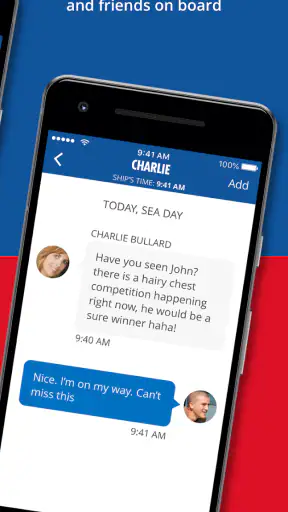
It is also useful for groups with different energy levels. One person may want entertainment, another may prefer a meal, and someone else may simply want downtime. Instead of repeatedly asking crew members or negotiating from memory, each person can look at the available information and suggest a plan. That does not eliminate disagreements, but it makes the conversation more concrete.
For families, I would suggest deciding in advance who is responsible for checking the schedule. If everyone constantly searches independently, the group can end up with several half-remembered plans. A better workflow is to review the day together, choose a few priorities, and leave open space between them. The app supports that planning style, but it cannot make the decisions for you.
What happens when the connection is unreliable
Connectivity is the part I would think about most carefully before relying on Carnival HUB. A cruise environment is not the same as using a phone on a normal city network. Access may vary depending on where you are, what service is available, and how the app is communicating at that moment. I would not build a tightly timed day around the assumption that every screen will always load instantly.
My practical advice is to check important information before leaving a comfortable connection point and to give yourself time before an activity begins. If you need to coordinate with another person, do not wait until the last minute to open the app. A small delay is harmless when you are choosing between two casual activities, but it becomes frustrating when you are already late or separated from your group.
This is where the app differs from a paper schedule. Paper is immediately readable and does not care about signal conditions, while a connected app can offer a more current view but may require patience. I would use Carnival HUB for timely planning and keep the most important details in mind after checking them. That combination is safer than treating either method as perfect.
If a page or item does not appear as expected, my first response would be simple: wait briefly, try again from a different location, and confirm that the phone itself still has a working connection. I would also avoid repeatedly tapping the same control, because that can make a slow response feel like a larger problem. If the information is essential, asking onboard staff remains the sensible fallback.
Recovery when plans or access do not go smoothly
One of the app’s less obvious roles is helping you recover from a missed or changed plan. Cruise days rarely unfold exactly as imagined. A meal may take longer, a child may need a break, or a group may decide to split up. Having the day’s information available makes it easier to choose the next reasonable option instead of treating one missed activity as a ruined schedule.
I found that the best recovery strategy is to avoid planning every minute. Use the app to identify a few things that matter most, then leave room for changes. If one item becomes impractical, you can return to the app and select something else without rebuilding the entire day. This is more realistic than creating a rigid sequence that depends on perfect timing and uninterrupted access.
There is also a social recovery benefit. When several people are trying to meet, confusion often comes from vague instructions such as “later” or “after lunch.” Checking the same information and agreeing on a clear next step reduces that uncertainty. It is not a full communication solution, but it can make group coordination less dependent on repeated calls or messages.
Still, I would not treat the app as a guarantee that every plan will be possible. Information can guide a decision, but the ship’s schedule, capacity, and real-world circumstances remain more important than what appears on a screen. The right mindset is to use Carnival HUB as a planning aid, then stay ready to adjust.
Keeping phone and data use under control
Because the app is connected to a cruise experience, careful phone habits are worthwhile. I would open it when I have a clear question rather than leaving it running while I move around. Short checks reduce battery use and prevent the phone from becoming the focus of the holiday. They also make it easier to notice when a connection is behaving differently from what you expected.
I would review the app before a busy day begins, especially if several people need to agree on plans. That lets you make decisions in one session instead of repeatedly refreshing while walking between locations. It is a small change, but it makes the experience feel calmer and gives you a better chance of noticing details that affect timing.
Travelers should also remember that a free download does not automatically mean every part of the surrounding cruise connectivity is free. The app itself costs nothing, but phone service, onboard access, or other travel-related charges can depend on the arrangements attached to your cruise and mobile provider. I would check those conditions separately rather than assuming the app and network access are the same thing.
This distinction is especially important for anyone traveling internationally. A phone may connect through cellular roaming, ship-based service, or another available network, and those options can have different consequences. I would keep mobile settings under control, use trusted access where appropriate, and avoid unnecessary background activity. Carnival HUB is more useful when it is part of a deliberate connectivity plan instead of an excuse to keep every online service active.
Who will get the most from it
The strongest audience is a Carnival passenger who wants a convenient way to organize onboard time. First-time cruisers may appreciate having a single place to consult while learning how the ship’s day works. Experienced cruisers can benefit too, particularly if they prefer choosing activities as they go rather than carrying a printed schedule.
It is also a good fit for travelers who share responsibility for a group. Parents can use it to coordinate around children’s needs, couples can compare preferences without making repeated trips, and friends can use the same reference point when deciding where to meet next. The benefit is not that the app removes planning; it makes planning lighter and more flexible.
People who should skip it are those looking for a broad travel app, a destination guide, or a tool that has value throughout an entire trip away from the Carnival cruise context. A general travel service will be better for flights, hotels, city maps, and reservations outside the ship. Likewise, someone who deliberately avoids phones on vacation may find that a printed or remembered schedule suits them better.
I would also hesitate to recommend making it the only source of important information. If a detail affects a time-sensitive commitment, a medical need, or a meeting with someone who has no access to the app, confirm it through an appropriate onboard channel as well. The app is convenient, but convenience should not replace sensible backup habits.
How it compares with the usual alternatives
The most obvious alternative is printed cruise information. Paper wins for instant access, simplicity, and independence from a phone. It is also easier to share with someone who does not want to install an app. Carnival HUB wins when you want a more personal, searchable, and adaptable way to review the day while moving around.
Another alternative is asking crew members whenever you need help. Staff interaction can be better when your question is specific, unusual, or affected by a real-time situation. The app is better for routine browsing, because you can explore options without waiting or interrupting someone. In my view, the two approaches complement each other rather than compete.
A general calendar or notes app can help you remember a plan, but it does not have the same cruise-specific purpose. You would have to enter details yourself and update them manually. Carnival HUB is more appropriate when you want to consult the cruise environment directly, while a notes app remains useful for personal reminders such as where your group agreed to meet.
That comparison explains why I would not judge it by the standards of a full travel platform. Its usefulness is concentrated rather than broad. If your trip includes several destinations and transport changes, use a wider travel tool for the overall journey and keep Carnival HUB for the onboard portion. That division of labor is more practical than expecting one app to handle everything.
Installation details and everyday expectations
Carnival HUB is available at no charge, carries an Everyone age rating, and is listed for devices using operating system version 11 or later. The current version is 4.4.0. Those details make it accessible for many travelers, although anyone using an older phone should check compatibility before the cruise rather than discovering a problem after boarding.
The app was released on January 15, 2015, and its continued presence is reflected in its broad adoption: it has passed five million installs. It holds a 4.6 average from around 182 thousand ratings, alongside roughly 72 thousand written reviews. Those figures suggest that it is not an obscure companion app, but popularity should still be interpreted in context. A high rating cannot remove the practical limits of shipboard connectivity or make the app equally useful for non-Carnival travel.
In day-to-day use, I would install it before traveling, open it early, and become familiar with the basic flow before I actually need to find something quickly. I would also make sure the phone is charged and that the app has been updated before departure. These are simple preparations, but they matter more on a cruise because a small technical issue can become inconvenient when you are far from your usual setup.
My connectivity verdict
After looking at how it fits into real cruise routines, I see Carnival HUB as a focused companion rather than a complete travel command center. Its best quality is that it brings onboard planning closer to the traveler, especially during those moments when people are moving, splitting up, or changing their minds. It can turn a vague day into a manageable set of choices without forcing you into a rigid itinerary.
Its weakness is inseparable from its purpose: the experience is tied to a connected mobile environment. I would not depend on it blindly, and I would not use it as a substitute for staff assistance, personal judgment, or a backup understanding of important plans. Checking early, limiting unnecessary phone use, and leaving room for changes make the app much more dependable in practice.
For a Carnival passenger who wants quick access to onboard information and enjoys planning from a phone, I think it is worth installing. For someone seeking a universal travel organizer or a completely screen-free holiday, another approach will be better. My recommendation is to treat Carnival HUB as a helpful onboard reference: use it to discover and adjust your day, but keep the flexibility and awareness that make a cruise enjoyable in the first place.


